


Tax season is here, and tax authorities like the IRS and HMRC are cracking down — and if you’ve traded, staked, or earned crypto, you know the headache of calculating your crypto taxes. The best crypto tax software can save you time, stress, and – most importantly – money.
In this guide, we’ll break down the top cryptocurrency tax software for 2026, comparing features, pricing, and ease of use. Whether you’re deep into DeFi or just buying and holding crypto, we’ve got you covered with tools like CoinLedger and ZenLedger.
The Top Cryptocurrency Tax Software Solutions
Before we dive into the details, here’s a quick overview of the best crypto tax software for 2026:
- Summ – Best for Complex DeFi & High-Accuracy Reconciliations
- CoinLedger — Most User-Friendly Software for DeFi & NFT Taxes
- Koinly – Best All-Rounder & International Support
- CoinPanda – Best for NFT Traders & Ease of Use
- TokenTax – Best for High-Net-Worth Individuals & Concierge Service
- CoinTracking — Best for Advanced Reporting & Professional Tax Use
- TurboTax — Best for Traditional Tax Filers with Crypto Holdings
These platforms simplify crypto tax reporting, helping you calculate gains, track transactions, and comply with tax regulations.
Detailed Crypto Tax Software Reviews
Now, let’s take a deep dive into the best crypto tax software for 2026. Below, we break down each platform’s key features, pricing, and integrations. Whether you’re an active trader, a DeFi enthusiast, or a long-term investor, these reviews will help you choose the best cryptocurrency tax software.
1. Summ — Best for Complex DeFi & High-Accuracy Reconciliations
Summ (formerly Crypto Tax Calculator) has carved out a niche as the “power user” choice in the crypto tax space. It is widely praised for its ability to handle complex on-chain activities that other platforms often mislabel, such as liquidity pooling, staking rewards, and intricate DeFi bridging. Its primary strength lies in its “Least Tax First Out” algorithm, an exclusive tool designed to minimize your liability by automatically selecting the highest cost-basis assets for disposal.

For investors who moved beyond simple exchange trades years ago, Summ offers a level of transparency that is hard to beat. You can drill down into the exact breakdown of how every single transaction was calculated, which is vital for maintaining an audit-trail. The platform also features a modern, high-speed interface optimized for bulk operations, allowing you to categorize hundreds of transactions simultaneously using keyboard shortcuts.
While the software is incredibly powerful, some users find the learning curve steeper than beginner-focused apps. It demands a bit more manual oversight to ensure every “broken” transfer is correctly linked, especially if you have a long, multi-year history across dozens of obscure chains.
Pricing
Summ offers a range of yearly plans based on transaction volume. You can import all your data for free to see your tax estimate before paying for a report:
-
Rookie ($49/year): Up to 100 transactions; includes basic reports.
-
Hobbyist ($99/year): Up to 1,000 transactions; the most popular choice for casual DeFi users.
-
Investor ($249/year): Up to 10,000 transactions; includes tax-loss harvesting and priority support.
-
Trader ($499/year): Up to 100,000 transactions; designed for high-frequency algorithmic traders.
Summ offers customized pricing for clients with up to 10 million transactions.
| Summ Overview | Details |
| Price | $49–$499/year |
| Free Plan | ✅ (Portfolio tracking & tax preview) |
| Countries Supported | Global support with specific IRS, ATO, and HMRC reports |
| Key Features | 1. Advanced DeFi & NFT Engine 2. “Least Tax First Out” Optimization 3. High-speed bulk editing |
| Integrations | 3,500+, including specialized DEXs and niche blockchains |
| Website | ➡️ Try Summ Today |
2. CoinLedger — Incredibly User-Friendly for DeFi & NFT Taxes
CoinLedger is known for its ease of use, particularly with DeFi and NFT transactions. It’s also great for complex tax scenarios like classifying cross-chain transfers.
It supports over 20k cryptocurrencies, NFTs, and DeFi transactions, and it integrates with 800+ exchanges like Coinbase and wallets like MetaMask. You can further streamline your tax filing with the TurboTax and TaxAct integrations.
These work very well, too. We did find some noted issues with integrations, but this was with niche exchanges in particular.
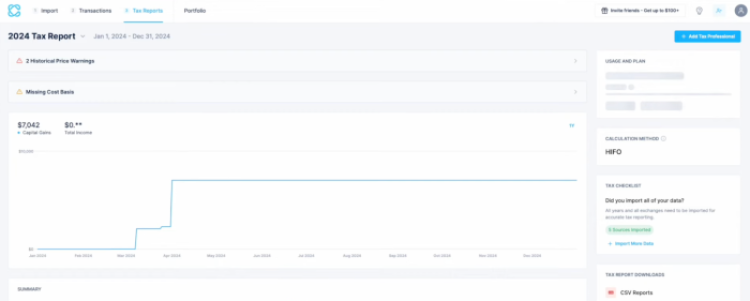
Overall, the platform simplifies the tracking and reporting of taxes related to decentralized finance activities and non-fungible tokens, even if you have no technical expertise.
For example, it automatically categorizes activities like staking and yield farming, pulling the data directly from your wallet. Whether it’s DeFi data like this or NFTs, you can see a clear overview of all your taxable events from a single dashboard.
Another big plus to using CoinLedger is that it offers free portfolio tracking that monitors your holdings in real-time. This is especially useful for active traders. While some feel the pricing is a bit high for casual traders, overall, CoinLedger is highly rated and an excellent choice for most.
Pricing
Here’s a quick breakdown of CoinLedger’s pricing plans:
- Free Plan: Import unlimited transactions and manage micro-transactions, alongside everything else, except reporting.
- Hobbyist ($49/year): Includes tax reports for up to 100 transactions.
- Investor ($99/year): Covers up to 1,000 transactions, suitable for more active traders.
- Pro ($199+/year): Supports up to 3,000 transactions, ideal for users with substantial trading activity.
All paid plans also come with a 14-day money-back guarantee, so you could essentially try the paid plans risk-free. For high-volume traders who exceed 3K transactions, CoinLedger offers flexibility with additional transaction packages within the app.
There’s even the ‘Done For You’ option ($300/hour), where you get a dedicated expert who handles the data importing, transaction classification, and tax report prep.
| CoinLedger | Overview |
|---|---|
| Price | $49-199/year |
| Free Plan | ✅ |
| Countries Supported | 16+, including the US, the UK, and Australia |
| Key Features | 1. User-friendly interface
2. Comprehensive DeFi and NFT support (even for free plan users) 3. Automated tax reporting |
| Integrations | 800+, including Binance, Coinbase, Kraken, Ledger |
| Website | ➡️Try CoinLedger Today |
3. Koinly — Best All-Rounder & International Support
Koinly is arguably the most popular crypto tax software globally, thanks to its massive library of over 1,000 integrations and a highly intuitive interface. It strikes a perfect balance between simplicity and depth, making it just as suitable for a first-time Coinbase user as it is for a seasoned “degen.” Koinly excels at international compliance, offering tailored tax reports for over 100 countries beyond just the U.S.

The platform includes a free tax-loss harvesting tool and an NFT dashboard that actually looks like a gallery, helping you track your digital collectibles alongside your tokens. One of its standout “quality of life” features is the ability to automatically detect transfers between your own wallets, preventing them from being incorrectly flagged as taxable sales—a common headache for crypto investors.
The main drawback noted by users is that Koinly can occasionally mislabel complex DeFi transactions (like LP tokens) on less common chains, requiring you to manually “merge” or tag them to ensure accuracy.
Pricing
Koinly’s pricing is straightforward and based on your total transaction count for the tax year:
-
Free: Unlimited imports and portfolio tracking (no tax report download).
-
Newbie ($49/year): Up to 100 transactions; includes Form 8949 and TurboTax export.
-
Hodler ($99/year): Up to 1,000 transactions; includes all tax reports.
-
Trader ($179/year): Up to 3,000+ transactions; includes priority support.
| Koinly Overview | Details |
| Price | $49–$179/year |
| Free Plan | ✅ (Unlimited tracking, no reports) |
| Countries Supported | 100+, with specific reports for US, UK, CA, DE, and more |
| Key Features | 1. Massive integration library 2. Smart transfer matching 3. Global tax compliance |
| Integrations | 1,000+, covering almost every major exchange and wallet |
| Website | ➡️ Try Koinly Today |
4. Coinpanda — Best for NFT Traders & Ease of Use
Coinpanda is frequently cited as the most “value-for-money” option because a single yearly plan gives you access to tax reports for all previous years, not just the current one. It has a heavy focus on accuracy for NFTs and Ordinals, supporting nearly every major blockchain including Ethereum, Solana, and Cardano.

The software is designed for speed; Coinpanda claims you can generate a complete tax report in under 20 minutes. It features a “Smart Tagging” system that automatically identifies mining, staking, and airdrops, which significantly reduces the amount of manual work required. It also provides a dedicated “Accountant Suite,” making it a favorite for CPAs who manage multiple crypto clients.
While it is very beginner-friendly, users with extremely high transaction volumes (20,000+) may find the pricing scales up more quickly than some competitors.
Pricing
Coinpanda offers a generous free tier for tracking, with paid plans for report generation:
-
Free: Up to 25 transactions for reports; unlimited tracking and imports.
-
Hodler ($79/year): Up to 100 transactions.
-
Trader ($149/year): Up to 1,000 transactions.
-
Pro ($249/year): Up to 3,000 transactions; includes smart contract analysis.
-
Satoshi ($389/year): Up to 20,000 transactions.
| Coinpanda Overview | Details |
| Price | $79–$389/year |
| Free Plan | ✅ (Up to 25 transactions for reports) |
| Countries Supported | 65+, including US, Canada, Australia, and Japan |
| Key Features | 1. NFT & Ordinal support 2. Multi-year reporting 3. AI-assisted transaction tagging |
| Integrations | 900+, including heavy focus on DeFi protocols |
| Website | ➡️ Try Coinpanda Today |
5. TokenTax — Best for High-Net-Worth Individuals & Concierge Service
TokenTax is more than just software; it is a full-service crypto accounting firm. While it offers a “DIY” software tier, it is best known for its VIP and Concierge services, where professional tax experts manually reconcile your data and even file your full tax return for you. This makes it the go-to choice for high-net-worth investors, crypto fund managers, and those with incredibly complex “edge case” transactions.

The software features a robust tax-loss harvesting dashboard and supports niche activities like margin trading, options, and cross-chain bridges. Because they have in-house CPAs, their reports are built to be “audit-defensible,” providing an extra layer of security for those worried about IRS scrutiny.
The obvious downside is the cost. TokenTax is significantly more expensive than its competitors, and there is no free version available to test the software before you buy.
Pricing
TokenTax plans are tiered by both volume and the level of professional assistance required:
-
Basic ($65/year): Up to 100 transactions; only supports centralized exchanges.
-
Premium ($199/year): Up to 5,000 transactions; includes DeFi, NFTs, and tax-loss harvesting.
-
Pro ($1,999/year): Up to 20,000 transactions; includes margin/options and FBAR reporting.
-
VIP ($3,499/year): Up to 30,000 transactions; includes full filing by a TokenTax CPA and expert consultations.
| TokenTax Overview | Details |
| Price | $65–$3,499/year |
| Free Plan | ❌ (No free tier) |
| Countries Supported | Global (US focus for full filing) |
| Key Features | 1. CPA-prepared returns 2. Margin & Options support 3. Audit-ready reporting |
| Integrations | 100+ (Quality over quantity; expert manual reconciliation available) |
| Website | ➡️ Try TokenTax Today |
6. CoinTracking — Best for Advanced Reporting & Professional Tax Use
CoinTracking is a leading crypto portfolio tracker and tax calculator designed for serious investors, traders, and tax professionals. With advanced reporting tools, real-time tracking, and extensive integrations, this platform is built for users who need precise control over their crypto tax reporting.
Whether you’re managing thousands of transactions or filing taxes for corporate clients, CoinTracking delivers customizable dashboards, easy-to-read charts, and tax reports tailored to your country’s regulations.

The platform provides 16 years of historical data, tracking 35,000+ coins and tokens, including NFTs and DeFi assets. The total value of all portfolios managed through CoinTracking is $41.5B, proving its widespread adoption among crypto investors and businesses.
You can automatically import data from over 300 exchanges and crypto wallets, ensuring that all transactions – spot trading, margin trading, DeFi, staking, and NFT transactions – are accurately recorded and categorized.
The platform supports multiple accounting methods, including FIFO, LIFO, and HIFO, allowing users to optimize their tax strategies.
Pricing
CoinTracking offers very competitive pricing plans. Here are your options:
- Free: Handle up to 200 transactions, suitable for beginners or casual traders.
- Pro ($12.99/month): Supports up to 3,500 transactions and includes additional features like priority support.
- Expert ($19.99/month): Covers up to 20,000 transactions, ideal for active traders requiring advanced functionalities.
- Unlimited ($69.99/month): Offers unlimited transactions and all available features, catering to professional traders and tax consultants.
Overall, CoinTracking is a platform that boasts a lot of positives for anyone looking to sort their crypto taxes. That said, you’ll find the odd reports of some users who find the interface a bit outdated and complex, especially on the mobile app.
Not a dealbreaker by any means, though.
| CoinTracking | Overview |
|---|---|
| Price | $12.99-69.99/month |
| Free Plan | ✅ |
| Countries Supported | 100+, with specific tax reporting features for the US, Germany, UK, Canada, Australia, and more. |
| Key Features | 1. Advanced tax reporting
2. Portfolio tracking & coin trends for over 35K coins 3. Integrates with 300+ exchanges and wallets |
| Integrations | 300+, including Binance, Coinbase, Kraken, MetaMask |
| Website | ➡️Try CoinTracking Today |
7. TurboTax — Best for Traditional Tax Filers with Crypto Holdings
TurboTax, developed by Intuit, has long been a trusted name in tax preparation software, catering primarily to traditional tax filers. It’s renowned for its user-friendly interface, providing step-by-step guidance through the tax preparation process.
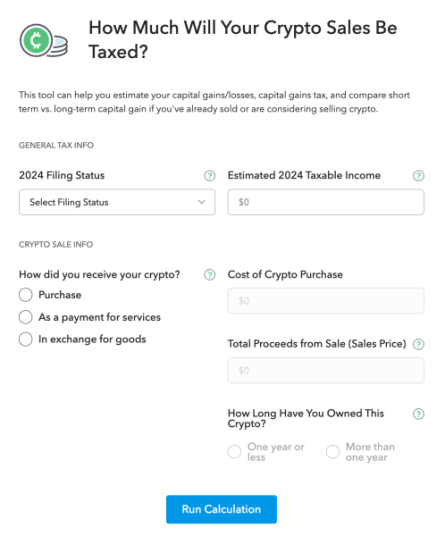
Recognizing the growing prevalence of crypto investments, TurboTax has integrated features to assist users in accurately reporting their crypto transactions. This makes it an excellent choice for individuals who are familiar with TurboTax and now need to incorporate cryptocurrency holdings into their tax filings.
For crypto investors, TurboTax Premium allows the automatic import of up to 20K transactions directly from various crypto platforms, simplifying the reporting process and reducing the potential for errors.
Pricing
TurboTax offers several pricing tiers to accommodate different tax situations. Here’s a quick overview of the different plans:
- Free Edition: Suitable for simple tax returns involving W-2 income and limited deductions.
- Turbotax ($0-$139): Ideal for taxpayers who itemize deductions.
- Assisted ($79-$209): designed for individuals with investments and rental property income.
- Full Service ($129+ for federal filing; state filing is an added $69 per state): Tailored for freelancers and small business owners.
For those needing more help, TurboTax Live Assisted and TurboTax Live Full Service options are available at higher price points. These services give you access to tax experts for personalized guidance.
| TurboTax | Overview |
|---|---|
| Price | $0-$209/filing |
| Free Plan | ✅ |
| Countries Supported | The US and Canada |
| Key Features | 1. Step-by-step guidance
2. Automatic import of crypto transactions 3. Access to tax experts for assistance |
| Integrations | Binance.US, Coinbase, Kraken, Robinhood |
| Website | ➡️Try TurboTax Today |
Quick Crypto Tax Software Comparison
To help you choose the best crypto tax software for your needs, here’s a side-by-side comparison of key features, pricing, and integrations across our top picks:
| Software | Price | Free Plan | Countries Supported | Key Features | Integrations |
|---|---|---|---|---|---|
| CoinLedger | $49-$199/year | ✅ | 16+, including the US, the UK, and Australia | 1. User-friendly interface
2. Comprehensive DeFi and NFT support 3. Automated tax reporting |
Binance, Coinbase, Kraken, Ledger |
| ZenLedger | $49-$399/year | ✅ | 40+, with explicit support for US tax documents | 1. Tax-Loss harvesting
2. TurboTax integration 3. DeFi and NFT support |
400+, including Binance, Coinbase, Ledger, MetaMask |
| CoinTracker | $59-$3,999/year | ✅ | 15+, including the US, UK, Canada, and New Zealand | 1. Portfolio tracking
2. Automated tax filing 3. DeFi and NFT support |
500+, including Binance, Coinbase, Gemini |
| CoinTracking | $12.99-$69.99/m | ✅ | Global (100+ countries) | 1. Advanced tax reporting
2. Portfolio tracking & coin trends for over 35K coins 3. Integrates with 300+ exchanges and wallets |
Binance, Coinbase, Kraken, MetaMask |
| TurboTax | $0-$209/filing | ✅ | The US and Canada | 1. Step-by-step guidance
2. Automatic import of crypto transactions 3. Access to tax experts |
Binance.US, Coinbase, Kraken, Robinhood |
What is Crypto Tax Software?
Crypto tax software is a specialized tool designed to automate the calculation of taxes on crypto transactions.
It connects to your exchanges, wallets, and DeFi platforms to track trades, staking rewards, and NFT purchases – helping you generate accurate tax reports based on your country’s regulations.
Instead of manually sorting through spreadsheets or guessing your cryptocurrency tax liability, these platforms apply tax rules like FIFO (First In, First Out) or LIFO (Last In, First Out) to ensure accuracy.
Whether you’re a casual investor or an active trader, crypto tax software saves time, minimizes errors, and helps you stay compliant.
Do I Need to Pay Taxes on Crypto?
Yes, in most countries, crypto taxes are a legal requirement. In the US and the UK, the IRS, HMRC, and other tax agencies treat crypto as property, meaning every trade, sale, or earned reward could trigger a taxable event.
Even if you haven’t cashed out to fiat, transactions like swapping one crypto for another or earning staking rewards may be subject to cryptocurrency tax rules. In the U.S., you’ll report your taxes on crypto using Form 8949 (for capital gains and losses) and Schedule D (to summarize totals).
If you earn crypto through mining or staking, it’s considered income and goes on Schedule 1 or Schedule C if it’s a business activity. Ignoring crypto tax reporting can lead to penalties, audits, or legal trouble.
The best way to stay compliant? Use the best cryptocurrency tax software to track and report everything accurately – before the IRS comes knocking.
Free Vs. Paid Cryptocurrency Tax Platforms
The main difference between free and paid crypto tax software comes down to transaction limits, features, and support. Free crypto tax software is great for beginners needing to sort just a handful of transactions.
It typically offers basic tracking and reporting, but some lack or offer limited features regarding things like DeFi, staking, and NFT tax calculations. Free versions also tend to limit the number of transactions you can import.
Paid crypto tax software is ideal for active traders, investors, and businesses. For example, some tools support unlimited transactions, integrate with platforms like TurboTax or work with tax professionals, and offer features such as tax-loss harvesting to help reduce your liability.
A paid plan is often worth the investment if you’re dealing with complex transactions.
How We Selected the Best Crypto Tax Solutions
We carefully evaluated each cryptocurrency tax software based on key factors that matter most to traders, investors, and businesses. Here’s what we considered:
- Reputation — We analyzed user reviews (on sites like Trustpilot), industry recognition, and platform reliability (uptime and security records).
- Ease of Use — Filing crypto taxes is complicated, so we prioritized platforms (and mobile apps) with intuitive dashboards, automated imports, and step-by-step guidance.
- Crypto-Specific Features — We looked for advanced tools like DeFi tax tracking, NFT support, and staking income calculations to cover all types of transactions.
- Feature-to-price Value — The best crypto tax reporting software should offer solid features at a fair price, with free trials or tiered pricing options.
- Compliance — We checked whether the software aligns with tax regulations in major countries, including the U.S., Canada, and the UK.
- Integrations — A great crypto tax platform should connect with major exchanges (e.g., Coinbase & Binance), wallets (i.e., Best Wallet, MetaMask), and tax-filing software like TurboTax.
- Support — Tax issues can be stressful, so we favored platforms with responsive customer service, FAQs, and access to tax professionals.
By weighing these factors, we’ve narrowed down the best cryptocurrency tax software to help you confidently file your taxes.
Concluding Our Guide on Crypto Tax Software
Filing crypto taxes doesn’t have to be a nightmare.
The right crypto tax software can automate calculations, track transactions, and help you stay compliant. Whether you need free crypto tax software for basic reporting or a premium option with DeFi, NFT, and staking support, there’s a platform for you.
Our top picks — CoinLedger and ZenLedger — offer a range of features to fit different needs and budgets. Before choosing, consider ease of use, integrations, and compliance with your country’s regulations.
Remember, this isn’t financial or tax advice. Always DYOR (Do Your Own Research) or consult a tax professional to ensure you’re meeting your tax obligations correctly.
FAQs
1. What is the best crypto tax software to use?
The best crypto tax software depends on your needs. ZenLedger is great for tax-loss harvesting, CoinTracker excels in portfolio tracking, and CoinLedger is the most user-friendly for DeFi and NFTs.
2. Can I do my own crypto taxes?
Yes, but it can be complex. You’ll need to track every transaction, apply tax rules like FIFO or LIFO, and fill out IRS forms like 8949 and Schedule D. Crypto tax software automates this process, reducing errors and saving time.
3. What is the best free tax software for crypto?
Many platforms offer free plans, but they usually have transaction limits. ZenLedger and CoinLedger have free tiers, but you may need a paid plan for full reporting if you’re an active trader or dealing with DeFi and NFTs.
4. Do I need to report crypto if I didn’t sell?
It depends. Buying and holding crypto isn’t taxable, but earning rewards from staking, mining, airdrops, or DeFi may be considered income. Check your country’s tax laws to ensure compliance, even if you didn’t sell.